Digital material culture
Karin Borochov
CNC


Electronics
First Lesson
const int red_led_pin= 3; \\ הגדרת פין 3 לנורה אדומה
const int yellow_led_pin= 4; \\ הגדרת פין 4 לנורה צהובה
const int green_led_pin= 5; \\ הגדרת פין 5 לנורה ירוקה
int dtime =45; \\הגדרת זמן השעייה כדי ליצור הבהוב
void setup() {
// put your setup code here, to run once:
pinMode(red_led_pin, OUTPUT); \\העברת מתח לפין 3
pinMode(yellow_led_pin, OUTPUT); \\העברת מתח לפין 4
pinMode(green_led_pin, OUTPUT); \\העברת מתח לפין 5
}
void loop() {
// put your main code here, to run repeatedly:
digitalWrite(red_led_pin, HIGH); \\הדלקת הנורה האדומה
delay(dtime); \\השעייה
digitalWrite(red_led_pin, LOW); \\כיבוי הנורה האדומה
delay(dtime); \\השעייה
digitalWrite(yellow_led_pin, HIGH); \\הדלקת הנורה הצהובה
delay(dtime); \\השעייה
digitalWrite(yellow_led_pin, LOW); \\כיבוי הנורה הצהובה
delay(dtime); \\השעייה
digitalWrite(green_led_pin, HIGH); \\הדלקת הנורה הירוקה
delay(dtime); \\השעייה
digitalWrite(green_led_pin, LOW); \\כיבוי הנורה הירוקה
delay(dtime); \\השעייה
Electronics
Second & third lessons
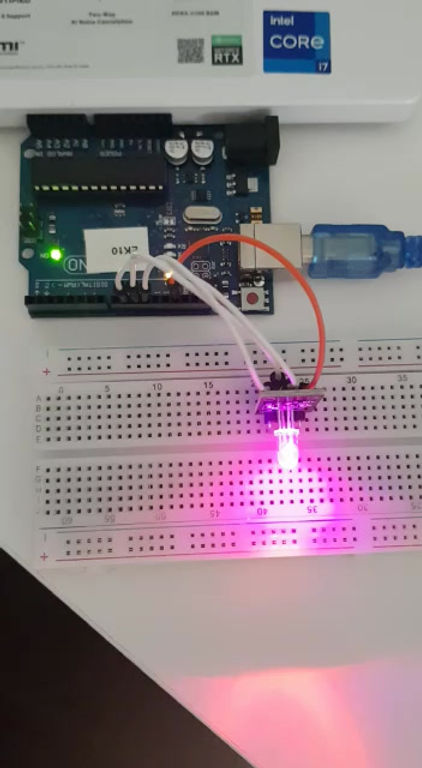
const int Rpin = 9; //הגדרת פין 9 לנורה האדומה
const int Gpin = 10; //הגדרת פין 10 לנורה הירוקה
const int Bpin = 11; //הגדרת פין 11 לנורה הכחולה
void setup() {
// put your setup code here, to run once:
pinMode(Rpin, OUTPUT); //העברת מתח לנורה האדומה
pinMode(Gpin, OUTPUT); //העברת מתח לנורה הירוקה
pinMode(Bpin, OUTPUT); //העברת מתח לנורה הכחולה
}
void loop() {
// put your main code here, to run repeatedly:
for (int i =255; i<=255; i-- ){ // ערכים הניתנים לשינוי בכח משנים את חוזק הנורה לקבלת מגוון צבעים
analogWrite(Rpin, i); //שינוי בנורה האדומה
analogWrite(Gpin, 0); // שינוי בנורה הירוקה
analogWrite(Bpin, 255-i); //שינוי בנורה הכחולה
delay(10); //השעיה
}
}

Electronics
fourth lesson
#include <LiquidCrystal.h>
#define PIN_BUTTON 2
#define PIN_AUTOPLAY 1
#define PIN_READWRITE 10
#define PIN_CONTRAST 12
#define SPRITE_RUN1 1
#define SPRITE_RUN2 2
#define SPRITE_JUMP 3
#define SPRITE_JUMP_UPPER '.' // Use the '.' character for the head
#define SPRITE_JUMP_LOWER 4
#define SPRITE_TERRAIN_EMPTY ' ' // User the ' ' character
#define SPRITE_TERRAIN_SOLID 5
#define SPRITE_TERRAIN_SOLID_RIGHT 6
#define SPRITE_TERRAIN_SOLID_LEFT 7
#define HERO_HORIZONTAL_POSITION 1 // Horizontal position of hero on screen
#define TERRAIN_WIDTH 16
#define TERRAIN_EMPTY 0
#define TERRAIN_LOWER_BLOCK 1
#define TERRAIN_UPPER_BLOCK 2
#define HERO_POSITION_OFF 0 // Hero is invisible
#define HERO_POSITION_RUN_LOWER_1 1 // Hero is running on lower row (pose 1)
#define HERO_POSITION_RUN_LOWER_2 2 // (pose 2)
#define HERO_POSITION_JUMP_1 3 // Starting a jump
#define HERO_POSITION_JUMP_2 4 // Half-way up
#define HERO_POSITION_JUMP_3 5 // Jump is on upper row
#define HERO_POSITION_JUMP_4 6 // Jump is on upper row
#define HERO_POSITION_JUMP_5 7 // Jump is on upper row
#define HERO_POSITION_JUMP_6 8 // Jump is on upper row
#define HERO_POSITION_JUMP_7 9 // Half-way down
#define HERO_POSITION_JUMP_8 10 // About to land
#define HERO_POSITION_RUN_UPPER_1 11 // Hero is running on upper row (pose 1)
#define HERO_POSITION_RUN_UPPER_2 12 // (pose 2)
LiquidCrystal lcd(11, 9, 6, 5, 4, 3);
static char terrainUpper[TERRAIN_WIDTH + 1];
static char terrainLower[TERRAIN_WIDTH + 1];
static bool buttonPushed = false;
void initializeGraphics(){ //Definition of hero's actions
static byte graphics[] = {
// Run position 1
B01100,
B01100,
B00000,
B01110,
B11100,
B01100,
B11010,
B10011,
// Run position 2
B01100,
B01100,
B00000,
B01100,
B01100,
B01100,
B01100,
B01110,
// Jump
B01100,
B01100,
B00000,
B11110,
B01101,
B11111,
B10000,
B00000,
// Jump lower
B11110,
B01101,
B11111,
B10000,
B00000,
B00000,
B00000,
B00000,
// Ground
B11111,
B11111,
B11111,
B11111,
B11111,
B11111,
B11111,
B11111,
// Ground right
B00011,
B00011,
B00011,
B00011,
B00011,
B00011,
B00011,
B00011,
// Ground left
B11000,
B11000,
B11000,
B11000,
B11000,
B11000,
B11000,
B11000,
};
int i;
// Skip using character 0, this allows lcd.print() to be used to
// quickly draw multiple characters
for (i = 0; i < 7; ++i) {
lcd.createChar(i + 1, &graphics[i * 8]);
}
for (i = 0; i < TERRAIN_WIDTH; ++i) {
terrainUpper[i] = SPRITE_TERRAIN_EMPTY;
terrainLower[i] = SPRITE_TERRAIN_EMPTY;
}
}
// Slide the terrain to the left in half-character increments
//
void advanceTerrain(char* terrain, byte newTerrain){
for (int i = 0; i < TERRAIN_WIDTH; ++i) {
char current = terrain[i];
char next = (i == TERRAIN_WIDTH-1) ? newTerrain : terrain[i+1];
switch (current){
case SPRITE_TERRAIN_EMPTY:
terrain[i] = (next == SPRITE_TERRAIN_SOLID) ? SPRITE_TERRAIN_SOLID_RIGHT : SPRITE_TERRAIN_EMPTY;
break;
case SPRITE_TERRAIN_SOLID:
terrain[i] = (next == SPRITE_TERRAIN_EMPTY) ? SPRITE_TERRAIN_SOLID_LEFT : SPRITE_TERRAIN_SOLID;
break;
case SPRITE_TERRAIN_SOLID_RIGHT:
terrain[i] = SPRITE_TERRAIN_SOLID;
break;
case SPRITE_TERRAIN_SOLID_LEFT:
terrain[i] = SPRITE_TERRAIN_EMPTY;
break;
}
}
}
bool drawHero(byte position, char* terrainUpper, char* terrainLower, unsigned int score) {
bool collide = false;
char upperSave = terrainUpper[HERO_HORIZONTAL_POSITION];
char lowerSave = terrainLower[HERO_HORIZONTAL_POSITION];
byte upper, lower;
switch (position) { //What happens above or under the hero
case HERO_POSITION_OFF:
upper = lower = SPRITE_TERRAIN_EMPTY;
break;
case HERO_POSITION_RUN_LOWER_1:
upper = SPRITE_TERRAIN_EMPTY;
lower = SPRITE_RUN1;
break;
case HERO_POSITION_RUN_LOWER_2:
upper = SPRITE_TERRAIN_EMPTY;
lower = SPRITE_RUN2;
break;
case HERO_POSITION_JUMP_1:
case HERO_POSITION_JUMP_8:
upper = SPRITE_TERRAIN_EMPTY;
lower = SPRITE_JUMP;
break;
case HERO_POSITION_JUMP_2:
case HERO_POSITION_JUMP_7:
upper = SPRITE_JUMP_UPPER;
lower = SPRITE_JUMP_LOWER;
break;
case HERO_POSITION_JUMP_3:
case HERO_POSITION_JUMP_4:
case HERO_POSITION_JUMP_5:
case HERO_POSITION_JUMP_6:
upper = SPRITE_JUMP;
lower = SPRITE_TERRAIN_EMPTY;
break;
case HERO_POSITION_RUN_UPPER_1:
upper = SPRITE_RUN1;
lower = SPRITE_TERRAIN_EMPTY;
break;
case HERO_POSITION_RUN_UPPER_2:
upper = SPRITE_RUN2;
lower = SPRITE_TERRAIN_EMPTY;
break;
}
if (upper != ' ') {
terrainUpper[HERO_HORIZONTAL_POSITION] = upper;
collide = (upperSave == SPRITE_TERRAIN_EMPTY) ? false : true;
}
if (lower != ' ') {
terrainLower[HERO_HORIZONTAL_POSITION] = lower;
collide |= (lowerSave == SPRITE_TERRAIN_EMPTY) ? false : true;
}
byte digits = (score > 9999) ? 5 : (score > 999) ? 4 : (score > 99) ? 3 : (score > 9) ? 2 : 1;
// Draw the scene
terrainUpper[TERRAIN_WIDTH] = '\0';
terrainLower[TERRAIN_WIDTH] = '\0';
char temp = terrainUpper[16-digits];
terrainUpper[16-digits] = '\0';
lcd.setCursor(0,0);
lcd.print(terrainUpper);
terrainUpper[16-digits] = temp;
lcd.setCursor(0,1);
lcd.print(terrainLower);
lcd.setCursor(16 - digits,0);
lcd.print(score);
terrainUpper[HERO_HORIZONTAL_POSITION] = upperSave;
terrainLower[HERO_HORIZONTAL_POSITION] = lowerSave;
return collide;
}
// Handle the button push as an interrupt
void buttonPush() {
buttonPushed = true;
}
void setup(){
pinMode(PIN_READWRITE, OUTPUT);
digitalWrite(PIN_READWRITE, LOW);
pinMode(PIN_CONTRAST, OUTPUT);
digitalWrite(PIN_CONTRAST, LOW);
pinMode(PIN_BUTTON, INPUT);
digitalWrite(PIN_BUTTON, HIGH);
pinMode(PIN_AUTOPLAY, OUTPUT);
digitalWrite(PIN_AUTOPLAY, HIGH);
// Digital pin 2 maps to interrupt 0
attachInterrupt(0/*PIN_BUTTON*/, buttonPush, FALLING);
initializeGraphics();
lcd.begin(16, 2);
}
void loop(){
static byte heroPos = HERO_POSITION_RUN_LOWER_1;
static byte newTerrainType = TERRAIN_EMPTY;
static byte newTerrainDuration = 1;
static bool playing = false;
static bool blink = false;
static unsigned int distance = 0;
if (!playing) {
drawHero((blink) ? HERO_POSITION_OFF : heroPos, terrainUpper, terrainLower, distance >> 3);
if (blink) {
lcd.setCursor(0,0);
lcd.print("Press Start");
}
delay(250);
blink = !blink;
if (buttonPushed) {
initializeGraphics();
heroPos = HERO_POSITION_RUN_LOWER_1;
playing = true;
buttonPushed = false;
distance = 0;
}
return;
}
// Shift the terrain to the left
advanceTerrain(terrainLower, newTerrainType == TERRAIN_LOWER_BLOCK ? SPRITE_TERRAIN_SOLID : SPRITE_TERRAIN_EMPTY);
advanceTerrain(terrainUpper, newTerrainType == TERRAIN_UPPER_BLOCK ? SPRITE_TERRAIN_SOLID : SPRITE_TERRAIN_EMPTY);
// Make new terrain to enter on the right
if (--newTerrainDuration == 0) {
if (newTerrainType == TERRAIN_EMPTY) {
newTerrainType = (random(3) == 0) ? TERRAIN_UPPER_BLOCK : TERRAIN_LOWER_BLOCK;
newTerrainDuration = 2 + random(10);
} else {
newTerrainType = TERRAIN_EMPTY;
newTerrainDuration = 10 + random(10);
}
}
if (buttonPushed) {
if (heroPos <= HERO_POSITION_RUN_LOWER_2) heroPos = HERO_POSITION_JUMP_1;
buttonPushed = false;
}
if (drawHero(heroPos, terrainUpper, terrainLower, distance >> 3)) {
playing = false; // The hero collided with something. Too bad.
} else {
if (heroPos == HERO_POSITION_RUN_LOWER_2 || heroPos == HERO_POSITION_JUMP_8) {
heroPos = HERO_POSITION_RUN_LOWER_1;
} else if ((heroPos >= HERO_POSITION_JUMP_3 && heroPos <= HERO_POSITION_JUMP_5) && terrainLower[HERO_HORIZONTAL_POSITION] != SPRITE_TERRAIN_EMPTY) {
heroPos = HERO_POSITION_RUN_UPPER_1;
} else if (heroPos >= HERO_POSITION_RUN_UPPER_1 && terrainLower[HERO_HORIZONTAL_POSITION] == SPRITE_TERRAIN_EMPTY) {
heroPos = HERO_POSITION_JUMP_5;
} else if (heroPos == HERO_POSITION_RUN_UPPER_2) {
heroPos = HERO_POSITION_RUN_UPPER_1;
} else {
++heroPos;
}
++distance;
digitalWrite(PIN_AUTOPLAY, terrainLower[HERO_HORIZONTAL_POSITION + 2] == SPRITE_TERRAIN_EMPTY ? HIGH : LOW);
}
delay(100);
}

Laser Cut
First lesson
בתרגיל הראשון עשינו ניסוי כדי להבין מהי העוצמה האופטימלית לחיתוך ולסימון ואיך המהירות משפיעה על החיתוך בעזרת שימוש בצבעים שונים והגדרתם בתוכנה.
בתרגיל השני עשיתי פאזל אשר חלקיו מתחברים לאחר החיתוך.

Exercise one
speed: 20 mm\s
power:
7- to mark
45- to cut deeper but not till the end
85- cut all the way
in the end both 45 and 85 were cut, if i had another opportunity i will chose less then 45.

Exercise two
speed: 25 mm\s
power: 80
one part did not connect' if i had another opportunity i would check the connections in autocad before the laser cut.
Laser Cut
Second lesson
בתרגיל זה תכננו אובייקט ולמדנו איך להעביר אותו מתלת מימד לדו מימד.

Rhino model

Plane objectives

Wood model

Wood model
Laser Cut
third lesson
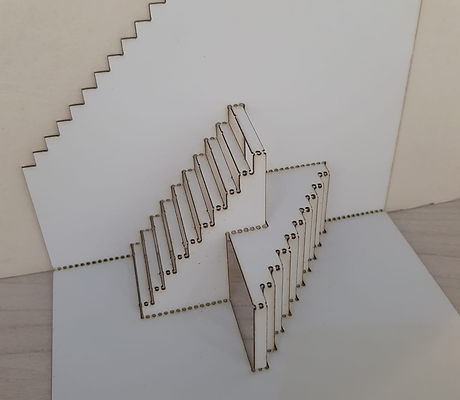
בתרגיל זה למדנו מספר שיטות שעוזרות לנו לכופף
עץ: אוריגמי, קיריגמי, וקרפינג
אני בחרתי בשיטת הקיריגמי (פופ- אפ) ויצרתי שני גרמי מדרגות לשני כיוונים שונים.


3D Printing
First lesson
בתרגיל זה התבקשו לעצב אובייקט שאי אפשר לייצר אותו בתבנית או בחיתוך לייזר.

Cura model

Rhino model

Physical model
3D Printing
Second lesson
בתרגיל זה התבקשנו לייצר קיר מלבנים אשר מורכבים מאובייקט שמשתנה בחלקו.

Cura model

Rhino model

Physical model
3D Printing
Third lesson
בתרגיל זה התבקשנו לייצר אובייקט היכול לנוע בעזרת משיכה, סיבוב, פנימה החוצה וכדומה.

Cura model

Physical model

Physical model

פרויקט סופי
בפרויקט זה ייצרנו אריח עץ ופסי אפוקסי הנדלקים בעזרת אורות לד וחיישני מרחק.
במהלך הפרויקט השתמשנו במכונת הCNC ואלקטרוניקה.
עיצבנו את הפלטות בהן השתמשנו, את הג'י- קודים לחיתוך במכונת הCNC, את הקוד לארדואינו, ואת חיבורי החיישנים והאורות לפלטה.
ניתן לייצר חלל ותחושה שונה בעזרת אריחים אלה, כלומר אפשר לחבר בניהם או להשאיר אותם כבודדים, הפלטות מייצרות אינטראקציה בין העוברים לבין האובייקט עצמו, בזכות חיישני התנועה.
בפרויקט נתקלנו בכמה קשיים :
ישנה מכונה אחת של CNC ועוד סטודנטים היו צריכים להשתמש בה, ולכן לא יכלנו לייצר פלטה נוספת.
קושי נוסף היה החיבור בין לדים שצורכים 12 וולט ללוח הארדואינו שמייצר 5 וולט, החיבור נעשה בעזרת מתג העושה את הקישור, לנו היו חמישה מתגים מה שאפשר לנו לחבר 5 חיישנים.
פרויקט סופי
נסיונות
פלטות שחתכנו ונכשלו בגימור הסופי שלהם ובגודל במשושים אותם יצרנו, גודלם לא התאים לגודל החיישנים בהם השתמשנו.
.jpeg)
ניתן לראות כי הגימור אינו מושלם, רואים את שאריות העץ שנחתך.
